How Agents Work: The Patterns Behind the Magic
Inside the loop that turns an LLM into a software engineer


You open Claude Code and describe a task: “Migrate all tests from Jest to Vitest”
The agent reads 47 test files. Rewrites them. Runs the test suite. Gets 12 failures. Fixes them one by one. Updates `package.json`. Removes old dependencies. Runs tests again. All pass. Commits the changes.
You did nothing. The agent just... figured it out.
Or you’re using GitHub Copilot in agent mode. You paste an error message. It searches your codebase, finds the relevant files, identifies the bug, writes a fix, runs your tests, and opens a PR.
This feels like magic.
But it’s not magic. It’s a pattern. A surprisingly simple one.
The Secret: It’s Just a Loop
Here’s the entire pattern:
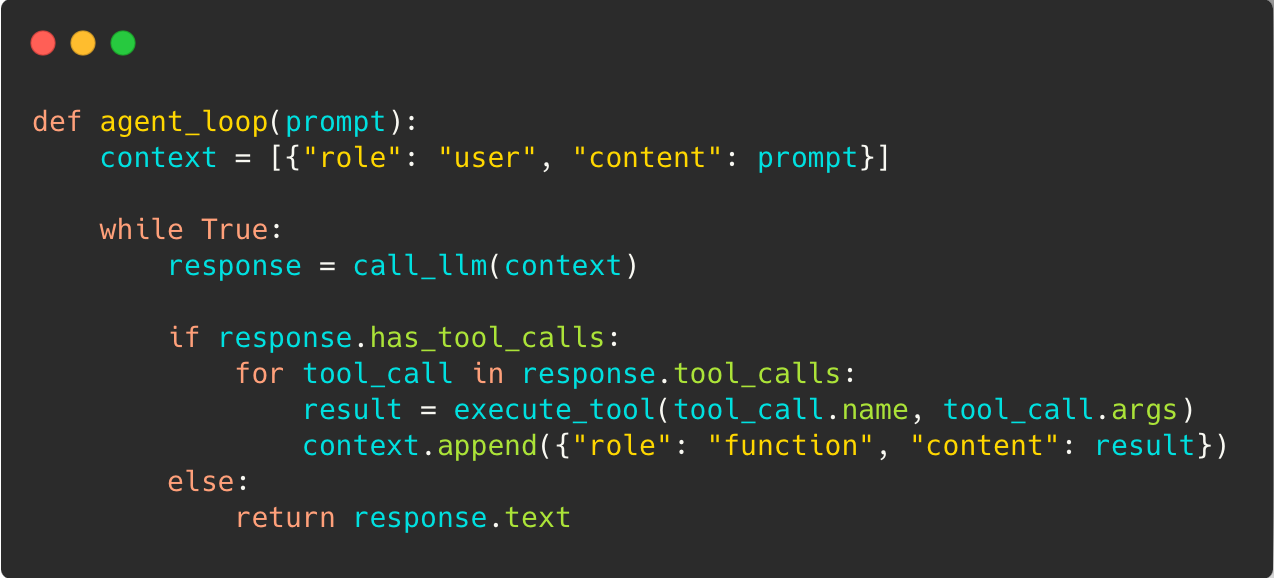
When you call an LLM, you provide context (instructions, your prompt, and history). The LLM then responds in one of two ways:
“I know the answer, here you go.”
“I need more information. I see you have a tool—can you run it and let me know the result?”
This simple pattern allows the LLM to run in a loop (autonomously) until it has figured it out.
Tools aren’t magic either. They’re just functions you expose:
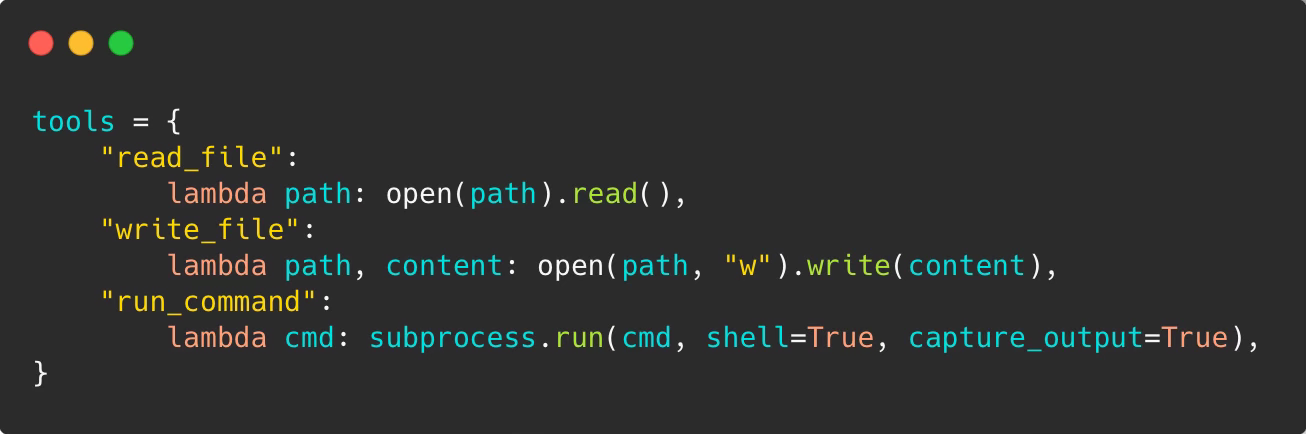
Give an LLM a few tools like read_file, write_file or run_command and watch it become a developer.
Here’s what happens on each iteration:
Build context — Combine the system prompt, conversation history, and tool results into a single payload
Call the LLM — Send everything to the model and wait for a response
Check for tool calls — The model either returns final text (done) or requests tool execution (continue)
Execute and update context — Run the requested tools, add their outputs to context, loop back to step 2
The model doesn’t “remember” anything between API calls. Every call includes the full conversation. That’s why agents can reason across multiple steps—they see the entire history each time.
That’s the core execution loop most coding agents (and not only) build on. Of course, production agents are more complex than this. There’s context management, rate limiting, cost control, tool sandboxing, and more. We’ll cover that later. Here we’re focusing on the core pattern.
The Prompt Is the Personality
The loop is the skeleton. The prompt encodes behavior.
Every production agent ships with a carefully tuned system prompt that shapes *how* the model reasons. This isn’t “you are a helpful assistant”—it’s operational guidance:

The prompt encodes:
Strategy — When to plan vs. act immediately
Guardrails — What actions require confirmation
Recovery behavior — How to handle repeated failures
Style — Terse or verbose, cautious or aggressive
Two agents with identical tools and the same model behave completely differently based on their prompts. GitHub Copilot’s agent uses a carefully crafted system prompt optimized for code assistance. Claude Code takes a bit different approach with system prompt and user prompts for different modes. Both work—for their use cases.
Ever wonder how popular coding agents like Claude Code or Codex work? We are collecting system prompts and internal configurations from popular AI agents in the agenticloops-ai/agentic-apps-internals repo — study them to see how the pros do it.
When debugging agent behavior, check the prompt first. The loop is usually fine. The instructions are usually the problem.
The Building Blocks
These aren’t historical stages—they’re tools in your toolkit. Pick the right one for your task.
Full code for these patterns is available on GitHub — fork it, break it, build on it: agenticloops-ai/agentic-ai-engineering
Level 1: One-Shot
You ask, it answers:

The model writes code it’s never run. That’s a gamble. No feedback, no iteration, no way to know if it works.
Level 2: Single Tool Call
The model can reach outside itself—once:
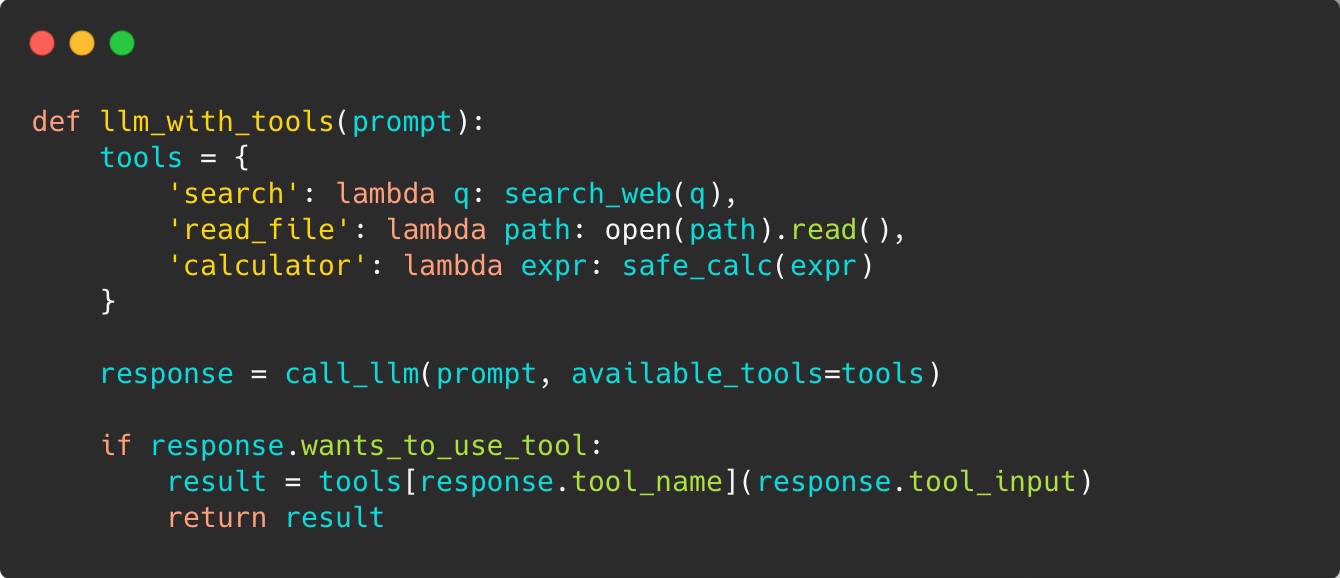
Note: This is conceptual pseudocode. Real implementations need schema validation, error handling, and sandboxing.
Now the model can search for information, read files, calculate things. But it only gets one shot. If the search fails or the code has a bug, it’s stuck.
Level 3: The ReAct Loop (Reason + Act)
The breakthrough came in 2022 with the ReAct paper from Princeton and Google. The insight: let the model use tools in a loop.
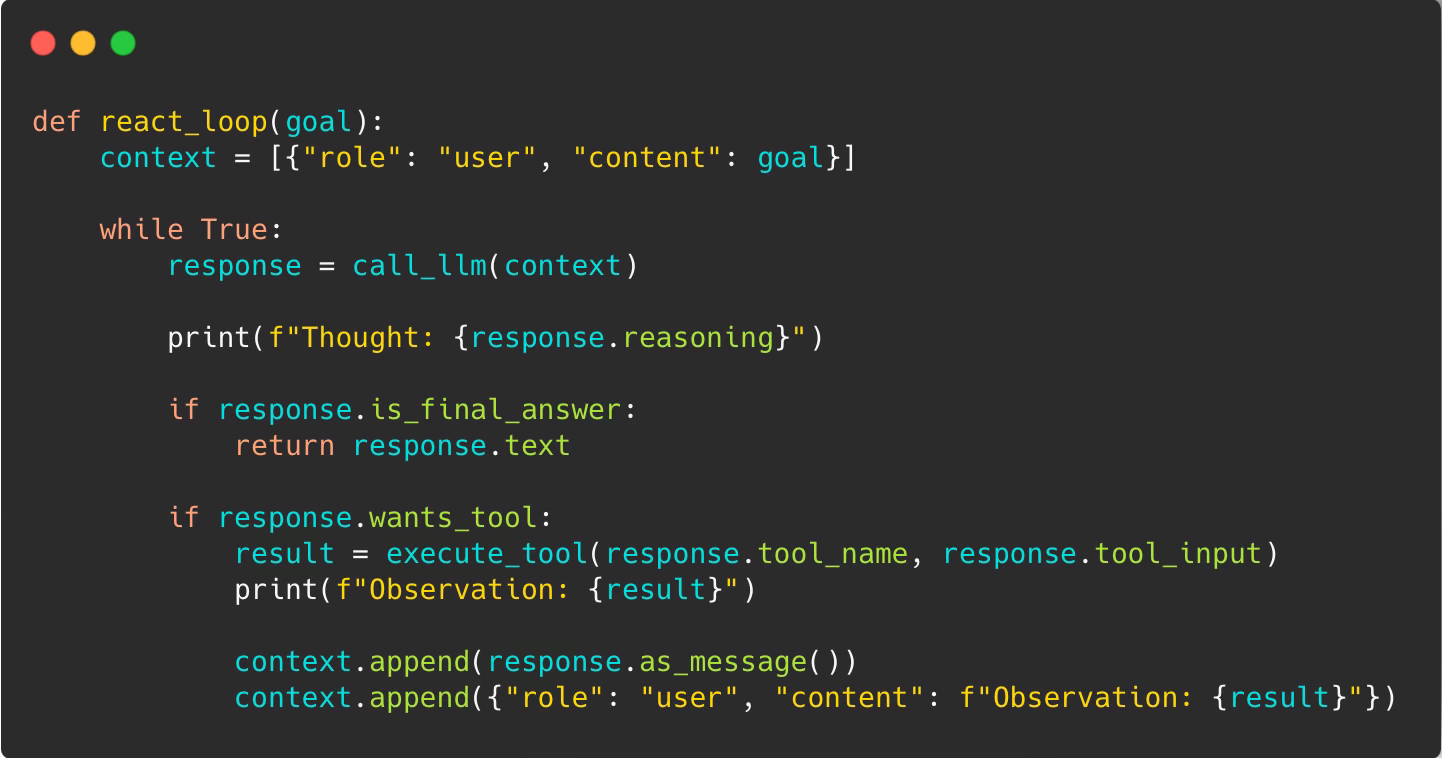
This unlocks genuine problem-solving.
Example: You ask “What’s the weather in the city where the Eiffel Tower is located?”
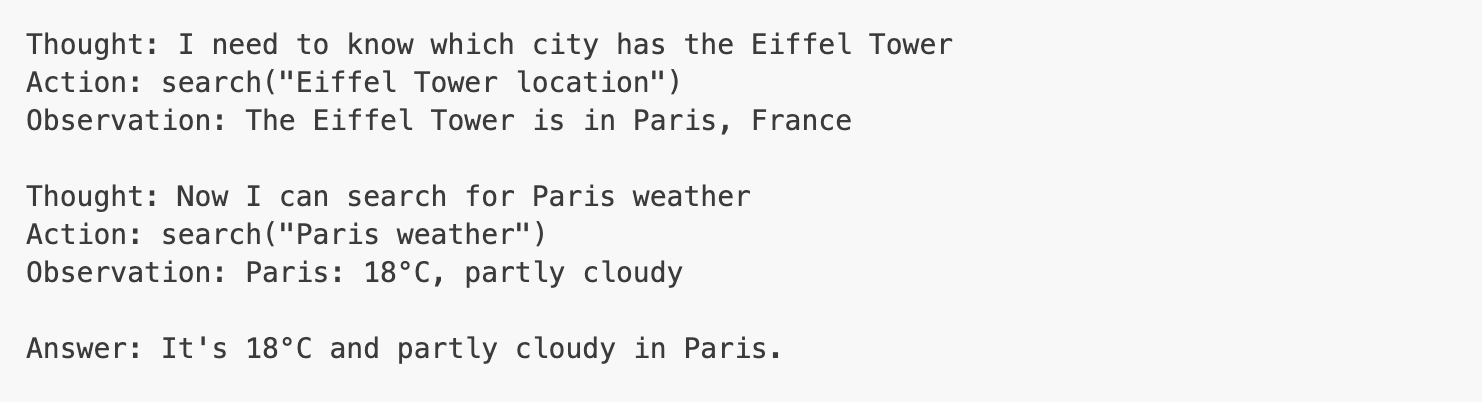
The model chains actions together. Each observation informs the next thought.
For code generation, this is transformative:
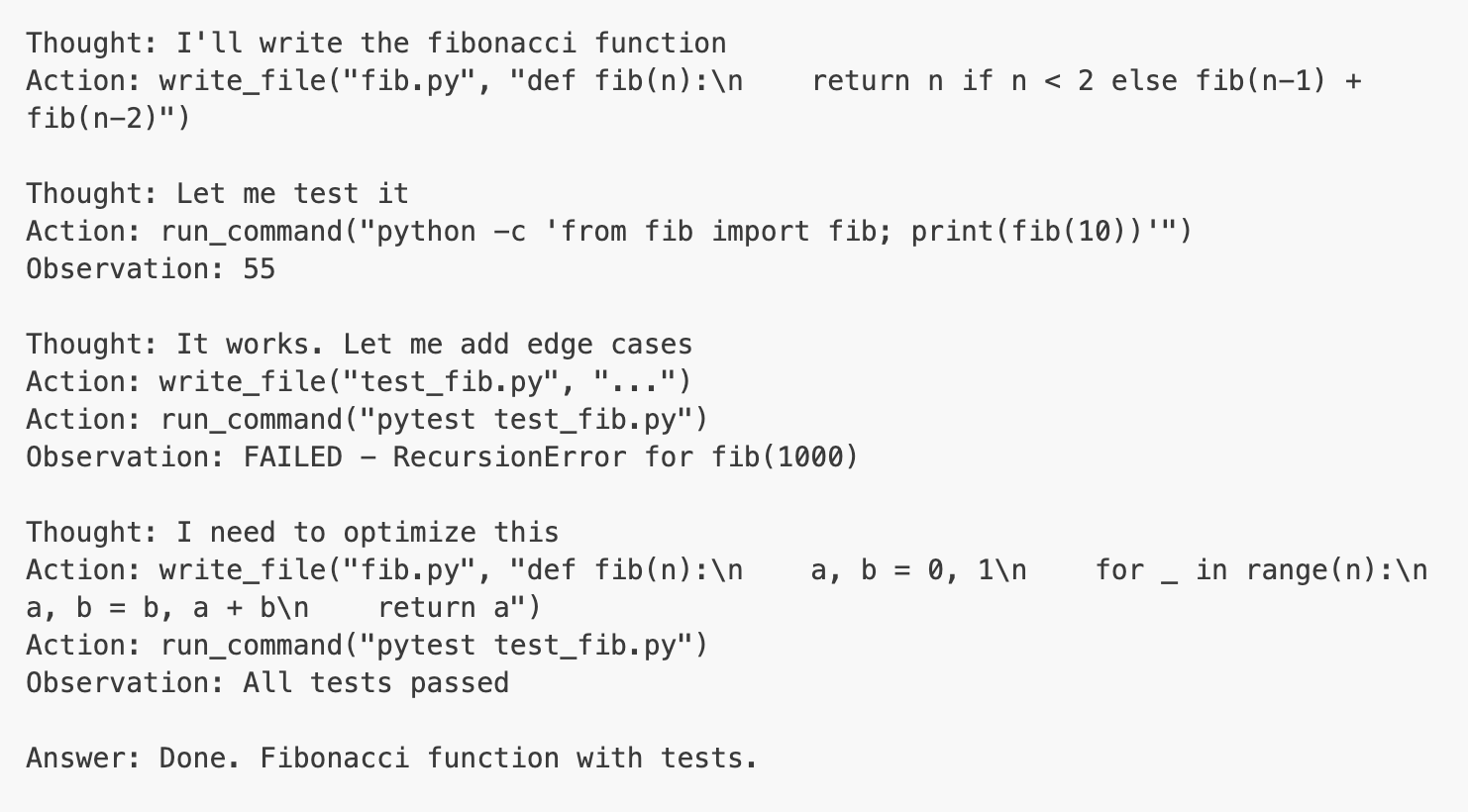
The key: let the model see what happened and decide what to try next.
Here’s the execution flow:
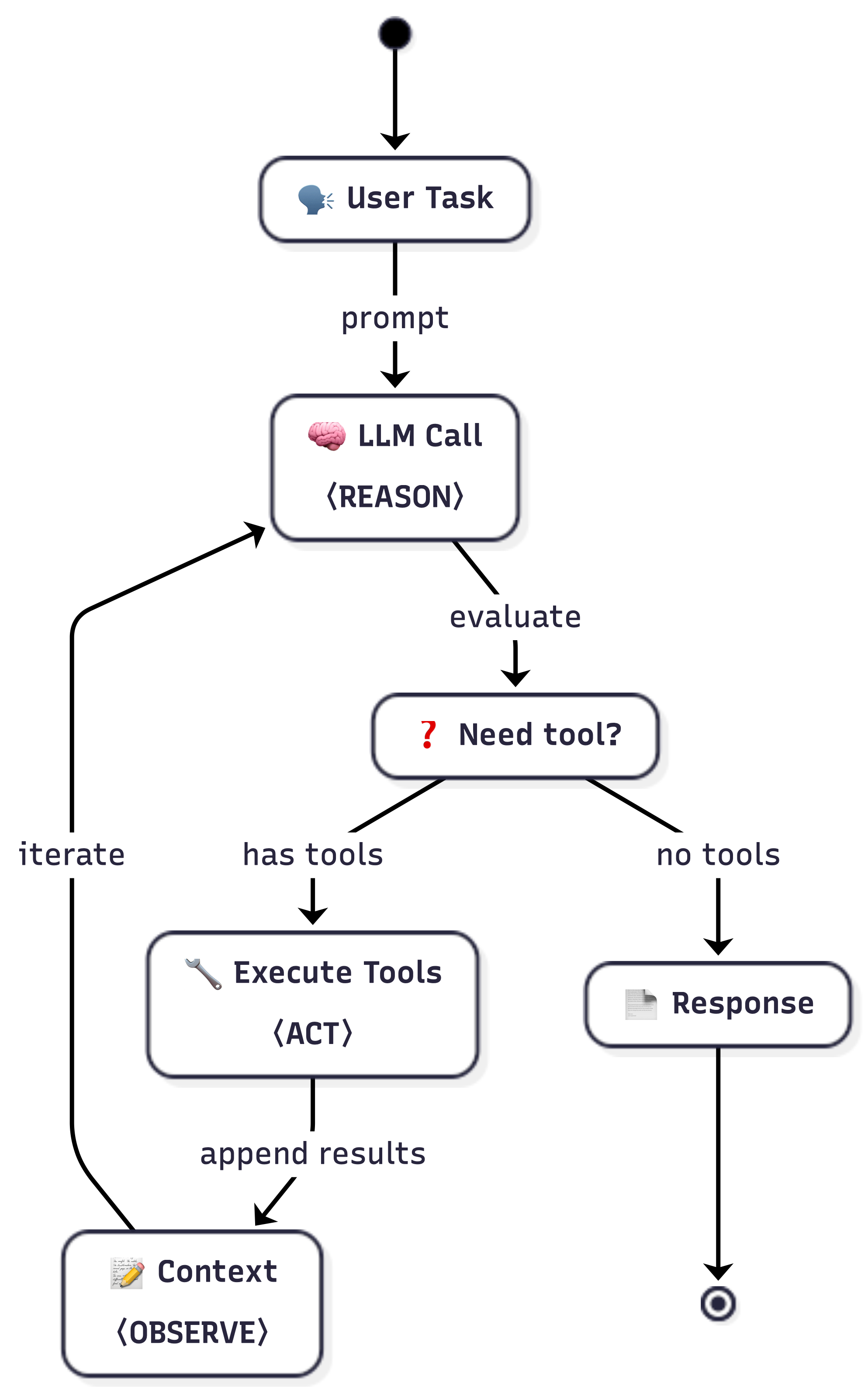
The loop continues until verification passes or max iterations reached.
Level 4: Planning Patterns
ReAct is reactive—it figures things out step by step. But for complex tasks, you want planning.
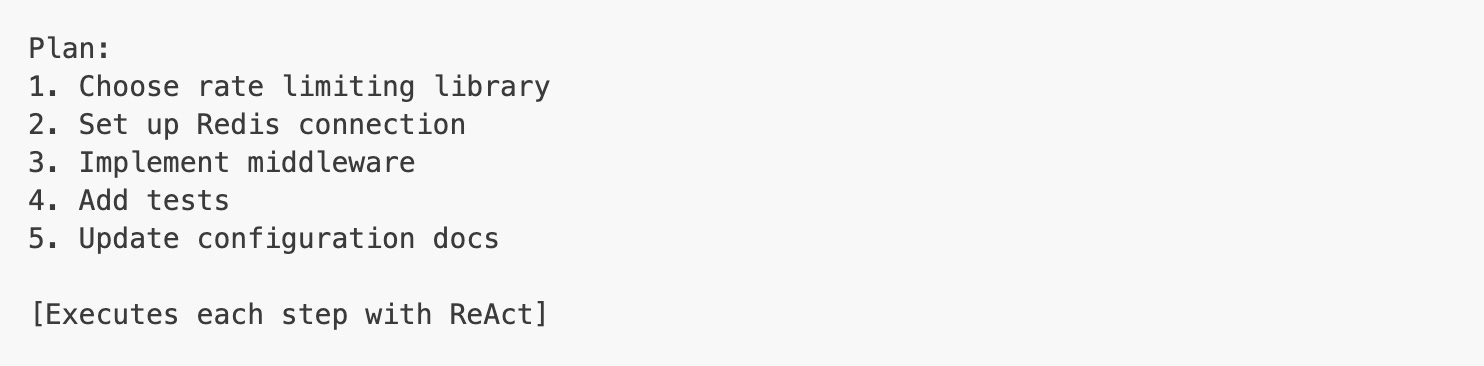
The Planning Pattern breaks work into steps first:
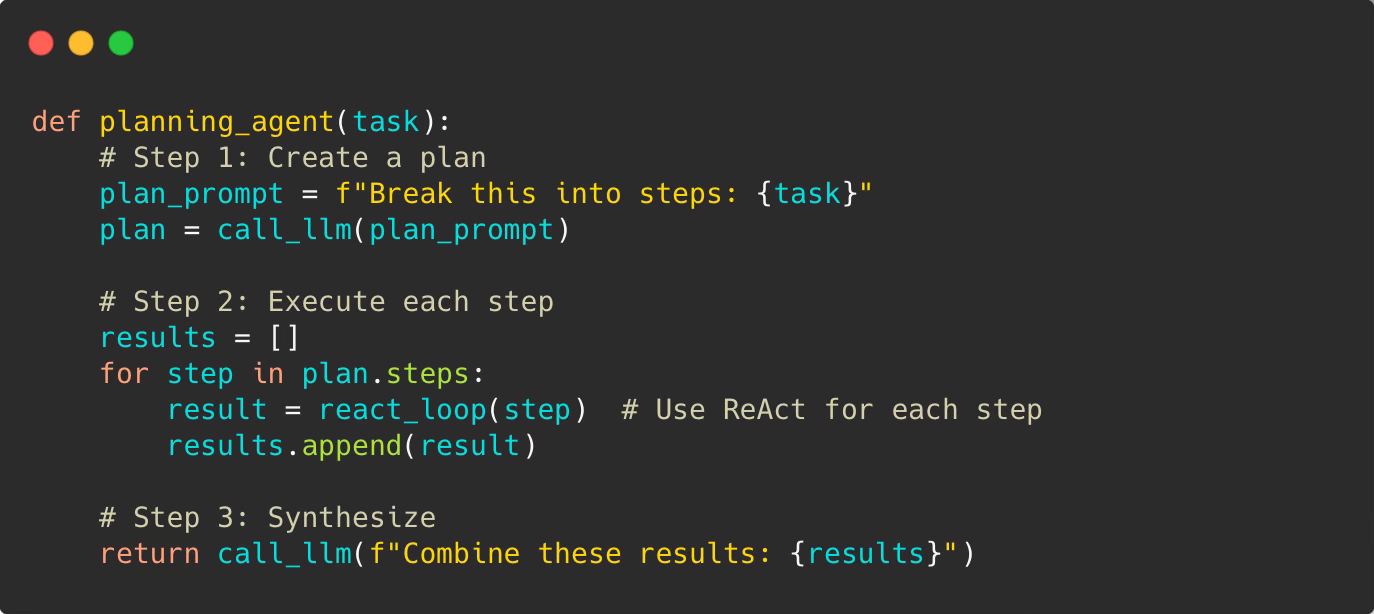
Example: “Build a REST API with authentication”
The agent plans:
Design database schema
Create user model
Implement auth endpoints
Add JWT token handling
Write tests
Deploy
Then executes each step using ReAct loops. Each step can iterate, use tools, recover from errors.
When planning helps:
Multi-file changes that need coordination
Architecture decisions before coding
Tasks with clear dependencies (must do A before B)
Large refactors where you need the full picture first
When ReAct is better:
Single-file edits or small changes
Bug fixes where you explore the problem
Responding to errors as they appear
Tasks where requirements emerge during work
Key difference: Planning is top-down (design then execute). ReAct is exploratory (act, observe, adjust).
Real agents often combine both:
Use Planning to break down the architecture
Use ReAct within each step to handle details and errors
Planning gives structure, ReAct gives adaptability
Pattern Comparison: Real Example
Let’s say you ask: “Add rate limiting to our API”
One-shot LLM:

Maybe it works, maybe not. No way to know.
Tool use (single call):

Stuck. Can’t fix the error.
ReAct loop:
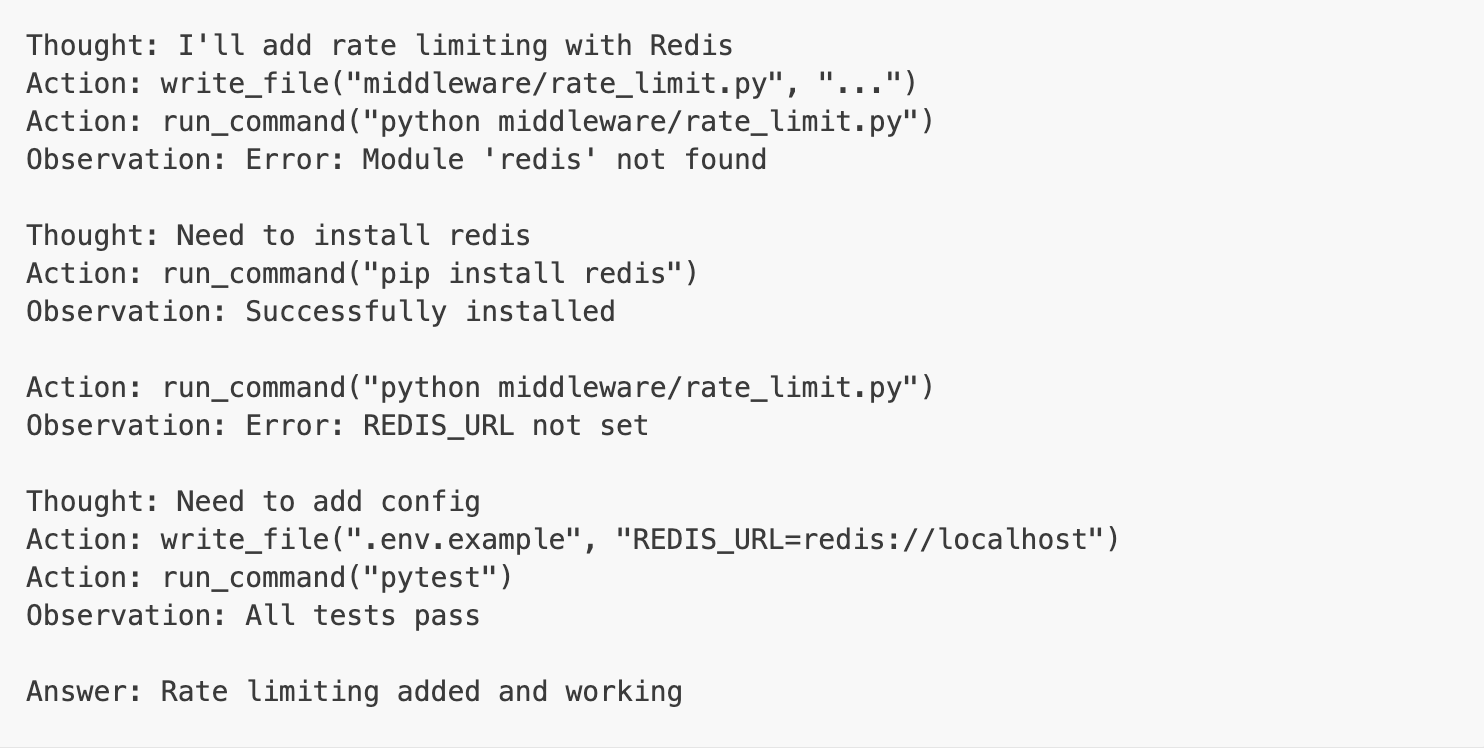
Planning pattern:
The Ralph Mode: Wrapping ReAct in an Outer Loop
Ralph (original concept by Geoffrey Huntley) extends the agentic loop pattern by adding an outer loop. Instead of one agent session, run the agent repeatedly until the entire project is done.
The Core Pattern
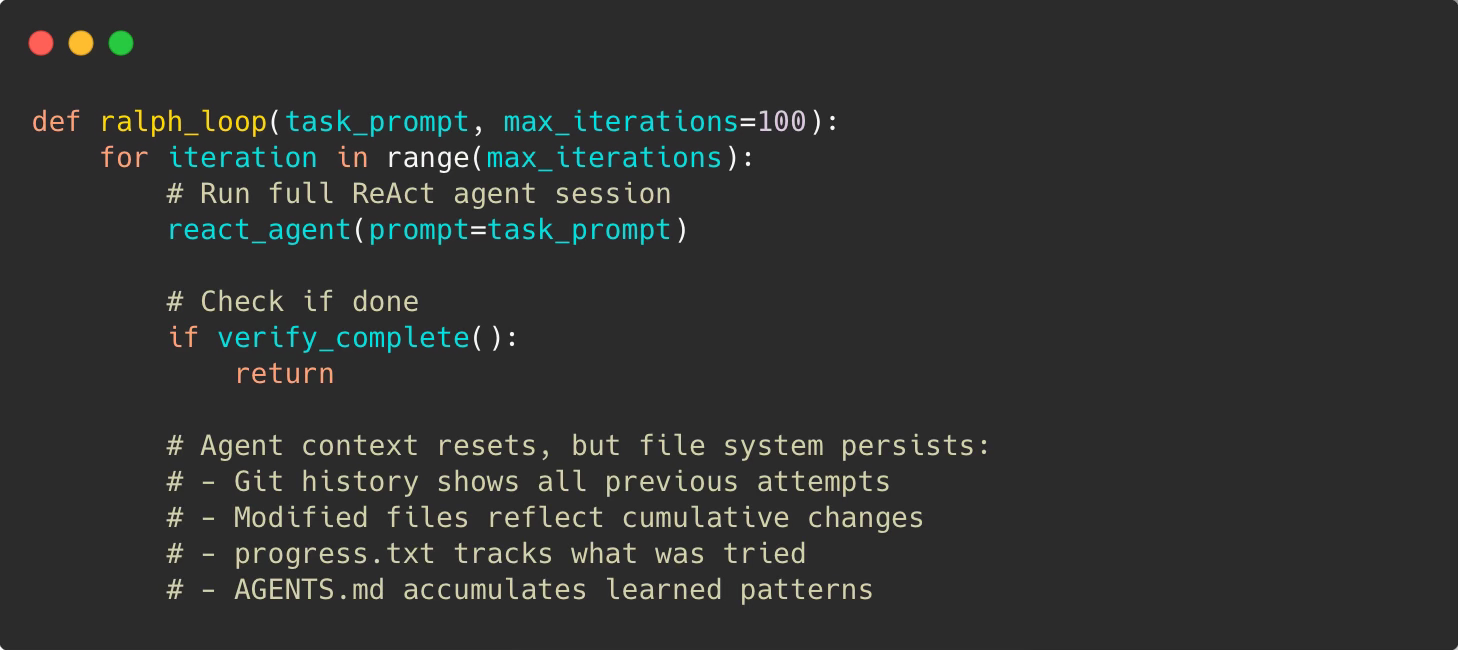
The key insight: Agent context resets each iteration (no token limit issues), but state persists through files.
”Better to fail predictably than succeed unpredictably.” — Geoffrey Huntley
Ralph accepts that agents will make mistakes. The question isn’t how to prevent errors—it’s how to make them visible and recoverable. Each iteration adds information. The loop converges toward success.
How It Works in Practice
Setup (following Ryan Carson’s approach):
Write PRD with feature requirements
Convert to atomic user stories (each fits in one context window)
Create completion criteria
Run the loop
Iteration example:
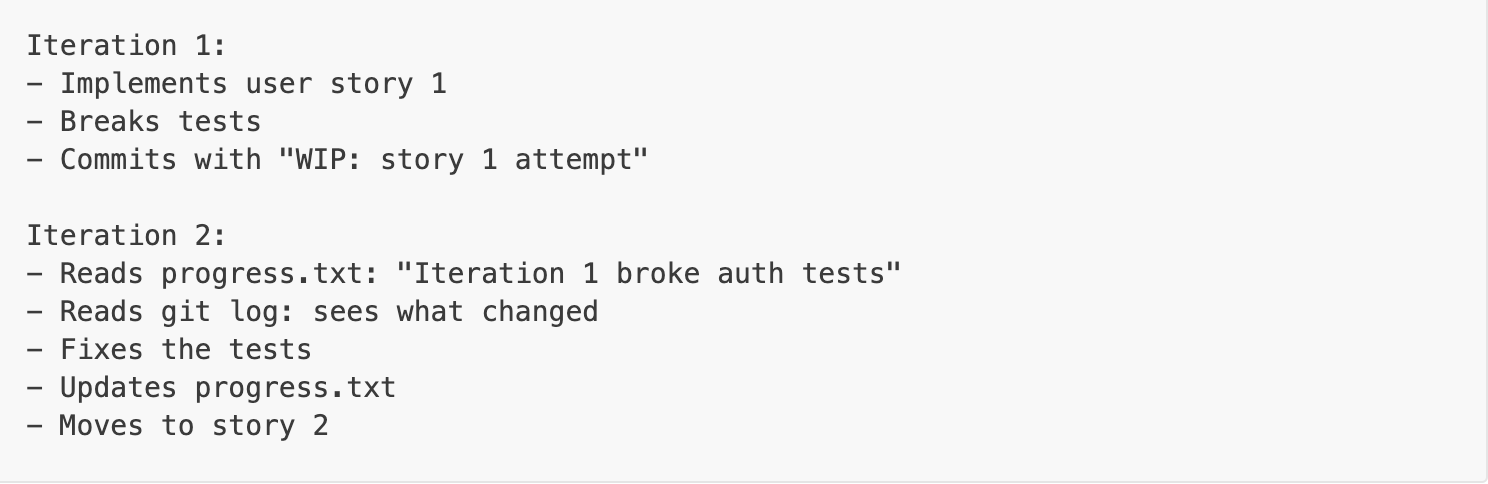
Memory between iterations:
progress.txt — iteration-to-iteration notes
AGENTS.md — permanent patterns and conventions
Git history — what was tried and why
Modified files — cumulative changes
When Ralph Works
Best for:
Large refactors (100+ files)
Feature implementation with clear requirements
Pattern migrations across codebase
Test coverage for existing code
Requires:
Clear success criteria (tests pass, linter clean)
Atomic tasks (each story fits in one context)
Good verification (actual checks, not LLM claims)
Doesn’t work for:
Vague requirements (”make it better”)
Architecture decisions
Creative/subjective work
Next Frontier: Agent Orchestration
Ralph runs one agent in a loop. The next step is running 20-30 agents in parallel — coordinated swarms across a codebase. Projects like Loom, Claude Flow, and Gas Town are pushing this boundary. Early days, high costs, wild failure modes — but the direction is clear.
We’ll cover multi-agent orchestration patterns in a dedicated post.
Everything Else Is Engineering
Once you understand the core patterns (ReAct, Planning, Ralph), everything else is software engineering. The loop is simple. Making it production-ready is where the real work is.
Production concerns:
Context window management — Summarization, sliding windows, sub-agents
Tool design — Task-specific tool sets, schema validation
Cost control — Budget tracking, early exit, prompt caching
Rate limiting — API quotas, exponential backoff
Error handling — Retries, circuit breakers, graceful degradation
Observability — Logging, tracing, replay for debugging
Safety & sandboxing — Permission controls, execution limits
Verification — Tests, linters, “definition of done” gates, evals
Sounds familiar? These are the same concerns you're already solving in distributed systems, microservices, and streaming pipelines. You're not learning a new discipline. You're applying good engineering to a new runtime.
From Theory to Practice
The best way to understand agents is to build one. You’ll learn more in a weekend than reading 100 blog posts.
Start with a minimal agent:
The full working code is on GitHub — clone it and experiment: minimal_agent.py
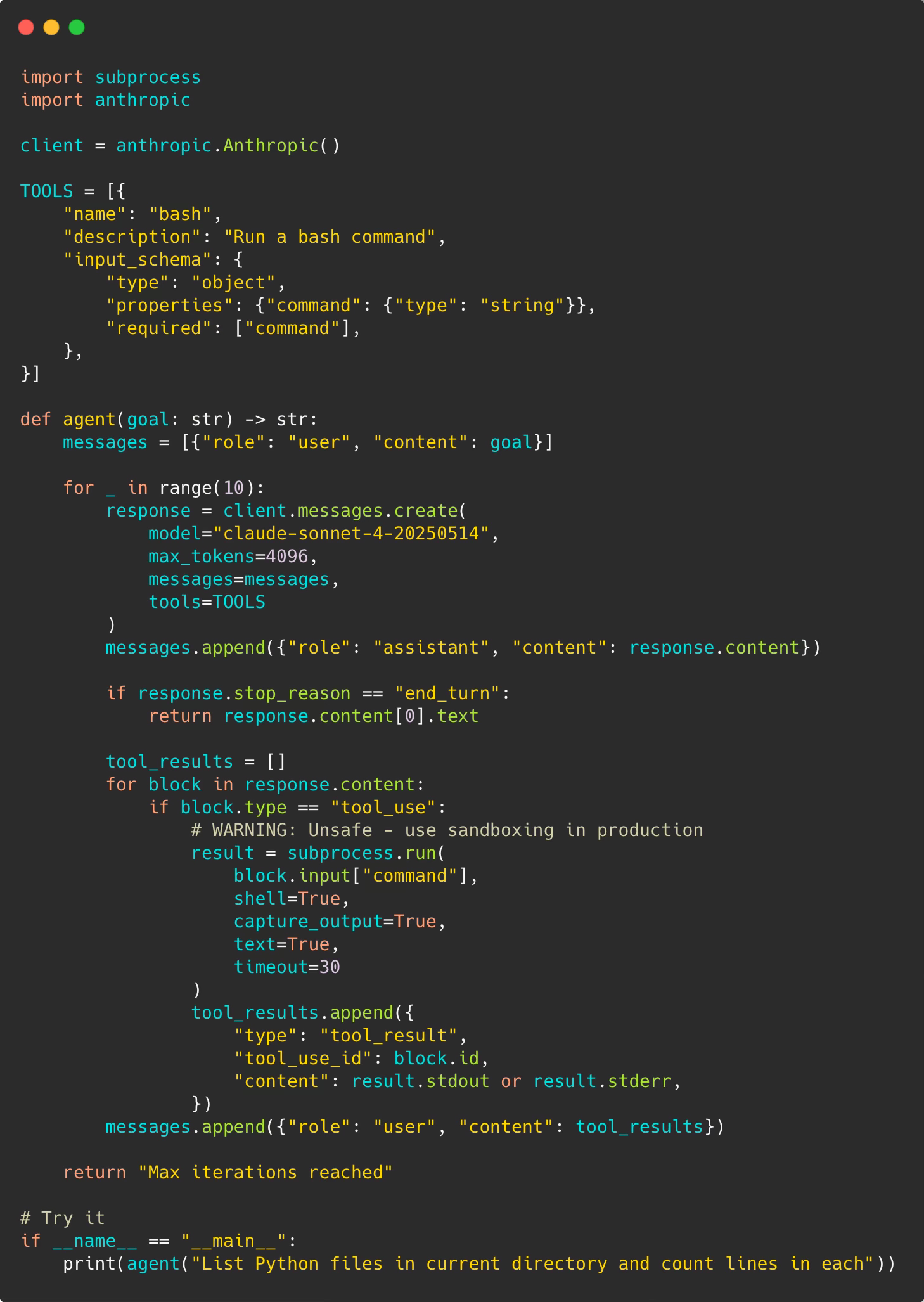
That’s ~50 lines. Now you have a working agent.
Then level up:
Add more tools (`read_file`, `write_file`)
Implement cost tracking
Add better error handling
Build verification checks
Try a small real task
Pattern Selection Guide
Choose based on your task:
One-shot LLM - Quick questions, text generation, explanations, no tools needed
Tool use - Needs current data, simple calculations, one external call
ReAct loop - Multi-step problems, needs iteration, can fail and retry, most coding tasks
Planning pattern - Complex architecture, multiple files, clear stages, dependencies between steps
Ralph pattern - Large scale (100+ files), mechanical work, clear success criteria, can run for hours
The progression isn’t replacing patterns. It’s adding options. Start simple, add what you need.
Real Results
YC Hackathon results: 6 repos overnight, $297 in API costs
Geoffrey Huntley’s CURSED: Full programming language over 3 months
Goldman Sachs / Devin pilot: File migrations 3-4 hours vs 30-40 hours for human engineers
Google internal migrations: 93,574 edits across 39 migrations, 74% AI-authored, engineers report 50% time reduction
Ramp / Devin: 150 feature flags removed in one month, 10,000+ engineering hours saved per month
OpenAI internal product: ~1M lines of code, 1,500 PRs, zero manually written code, built at ~1/10th estimated manual time
Anthropic / Claude Code: 90-95% of Claude Code’s own codebase written by Claude Code
The future isn’t coming. It’s already shipping code.
Resources and Further Reading
Core Papers:
ReAct: Synergizing Reasoning and Acting in Language Models — The original 2022 paper from Princeton/Google
Practical Guides:
Geoffrey Huntley on Ralph — Philosophy and practice of autonomous loops
Simon Willison on Agentic Loops — Practical advice for Claude Code
Tools/API:
Claude Code — Anthropic’s coding agent with Ralph plugin support
OpenAI API — Standard LLM API for building agents
Anthropic API — Claude API with tool use support
Conclusion
The magic of Claude Code and GitHub Copilot isn’t the LLM. It’s the loop.
The pattern is simple: Reason → Act → Observe → Repeat
But this simplicity creates genuine problem-solving capability. We’ve moved from AI that generates text to AI that accomplishes tasks.
The patterns:
Agentic loop (ReAct): For iterative problem-solving
Planning: For complex multi-step tasks
Ralph: For autonomous large-scale work
None of this requires fancy frameworks. Just an LLM API, some tools, and a loop.
Build one this weekend. You’ll understand agents better than reading 100 blog posts.
Full code for these patterns is available at agenticloops-ai/agentic-ai-engineering on GitHub — fork it, break it, build on it.
We’re publishing agent engineering content every week. No hype. Just code and learned patterns.
Coming next week: Disassembling AI Agents Part 1: How GitHub Copilot works?
What patterns are you using in production? What’s breaking? What’s working? Share in the comments—we’re building this community together.
The loop description is exactly right and also the part most people skip when they talk about agents in public. They show the outputs, not the architecture.
Running this loop in production across hundreds of sessions changes how you think about context management. The biggest practical lesson: what you put in the system prompt matters less than what you do with accumulated context mid-loop. That's where most agents start failing on longer tasks.
I built a night shift system where the agent runs autonomously for hours. The loop patterns you describe here are exactly what I had to learn the hard way before it ran reliably: https://thoughts.jock.pl/p/building-ai-agent-night-shifts-ep1
Good explainer. The production layer section especially.