Disassembling AI Agents - Part 3: OpenCode
How does OpenCode compare to Claude Code and Copilot? Inside the prompts, tools, and architecture of the open-source, provider-agnostic coding agent.

In Part 1, we disassembled GitHub Copilot - 65 tools, three models, and a prompt architecture designed for a polished IDE experience. In Part 2, Claude Code - aggressive prompt caching, trust-based mode control, and tool descriptions longer than most system prompts.
Now we’re disassembling OpenCode. The open-source, provider-agnostic coding agent built by Anomaly Innovations. Its system prompt opens with: “You are OpenCode, the best coding agent on the planet.”
Every coding agent is built on the same foundational patterns: ReAct loops, tool use, stateless inference. What sets each apart is the trade-offs they make on top.
Claude Code can optimize prompts for its own models, exploit specific instruction-following behaviors, and tune the system to capabilities it knows intimately. OpenCode doesn’t own the model. It’s open-source, provider-agnostic, and runs on 75+ models across OpenAI, Anthropic, Google, and local providers. The system prompt can’t assume which model will read it. The tools can’t depend on model-specific behavior. Everything has to be generic enough to work everywhere and specific enough to actually work.
Here’s what’s actually going on.
In this post, we cover:
Eleven hundred words. The shortest system prompt in the series. What’s in it, what’s missing, and a surprisingly detailed output formatting design system.
One model, any model. 75+ models, zero provider lock-in. The trade-off: you can’t optimize for what you don’t own.
Ten tools. Dedicated read tools, a single patch-based write tool, and
webfetchas a first-class citizen.apply_patch and the LSP feedback loop. Structured diffs for file editing. LSP diagnostics baked into tool results. The model changes strategy mid-session based on tool feedback.
The title tax. One overhead request per session for a conversation title nobody asked for.
Same prompt, same enforcement. Identical prompt and tools across build and plan modes. Plan mode enforced via
<system-reminder>injection, same pattern as Claude Code.What a real session looks like. Turn-by-turn walkthrough of both modes.
What engineers can take away. Prompt size vs capability, integrated feedback loops, provider agnosticism costs, and the mode enforcement spectrum.
All prompts, tools, and session traces referenced in this post are extracted and available in the agenticloops/agentic-apps-internals GitHub repo.
Eleven Hundred Words
Copilot’s system prompt is ~3,900 words. Claude Code’s is ~2,350. OpenCode’s is 1,171.
The system prompt opens with a single identity line: “You are OpenCode, the best coding agent on the planet.” No values framework. No personality section. No escalation rules. Just a bold claim and then straight to operational instructions.
What follows is compact but familiar: editing constraints (ASCII default, minimal comments), git safety rules (“NEVER revert changes you didn’t make”, “NEVER use destructive commands”), workspace hygiene, and a frontend design section that calls out generic-looking layouts - “avoid collapsing into bland, generic layouts. Aim for interfaces that feel intentional and deliberate.” It even bans “purple-on-white defaults” by name.
Compare this to what Copilot and Claude Code invest prompt tokens in:
What Copilot has that OpenCode skips:
A
<personality>section with behavioral directivesXML-structured mode instructions (
<modeInstructions>,<task_execution>)A quantified 3-strike rule for failed tool calls
Multiple model routing and activity summary prompts
What Claude Code has that OpenCode skips:
An anti-over-engineering manifesto (“three similar lines of code is better than a premature abstraction”)
Reversibility and blast radius assessment guidelines
Prompt injection awareness (“flag it directly to the user”)
Permission denial reasoning (“think about why the user denied the tool call”)
Philosophy-over-rules failure handling
OpenCode’s bet: you don’t need philosophy if your instructions are clear enough. No abstract principles about pragmatism or rigor. No guidance on how to think about failure. Just concrete rules: what to do, what not to do, how to format the output.
The output formatting is where OpenCode goes deeper than either Copilot or Claude Code. The prompt defines a complete design system for CLI text: headers are optional (“short Title Case wrapped in …”), bullets use - and merge related points (4-6 per list, ordered by importance), monospace is for commands/paths/code identifiers only, file references must be standalone clickable paths with optional :line[:column] suffixes, no ANSI codes, no nested hierarchies, no emojis unless asked.
This is the most prescriptive output specification in any coding agent we’ve analyzed. Copilot’s formatting rules are a few lines. Claude Code says “be extra concise” and moves on. OpenCode defines a visual grammar.
The system prompt also specifies when to ask questions - and the threshold is high: “only ask when you are truly blocked after checking relevant context AND you cannot safely pick a reasonable default.” Destructive actions, production changes, or missing credentials qualify. Everything else: just do it.
One Model, Any Model
OpenCode is provider-agnostic. It supports 75+ models across OpenAI, Anthropic, Google, and local providers through its Zen gateway or direct provider configuration. Like the other agents, OpenCode can use a cheaper, smaller model for lightweight tasks like title generation.
The trade-off: Claude Code can exploit Claude’s instruction-following patterns. Copilot can tune prompts to OpenAI’s model behaviors. OpenCode’s prompt has to work across all of them, which means it can’t optimize for any of them.
This is where Zen comes in. It’s more than a proxy. It’s a curated gateway that tests and benchmarks specific model-provider combinations for coding agent workflows. Out of 75+ available models, only a handful are recommended: GPT 5.2, GPT 5.1 Codex, Claude Opus 4.5, Claude Sonnet 4.5, Minimax M2.1, Gemini 3 Pro. The rest are available but not validated for agent use. It’s also how they monetize: zero markup on per-request pricing, funded by a prepaid balance.
In our captured session, we use gpt-5.3-codex via OpenAI.
Ten Tools: Read Structured, Write via Patch
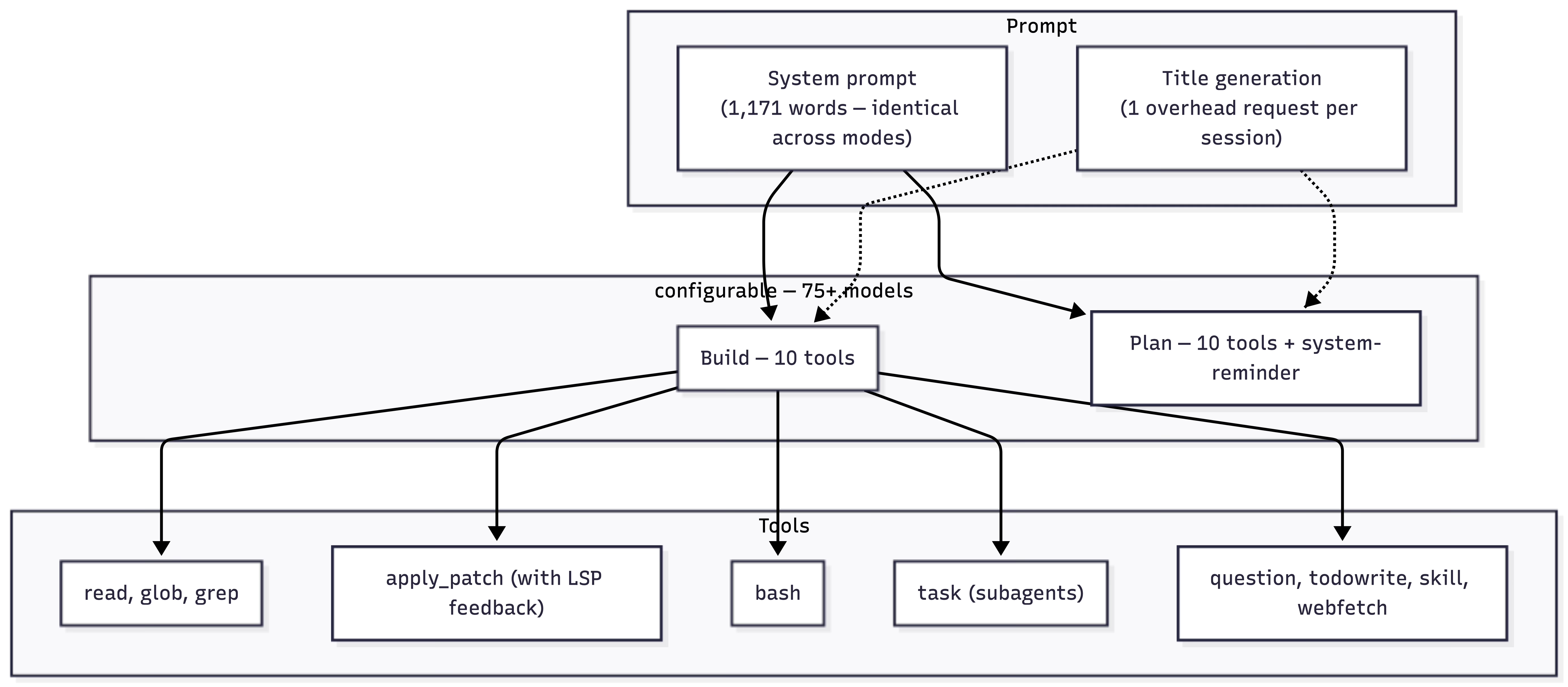
Copilot gives the model 65 tools. Claude Code gives it 24. OpenCode gives it 10.
The full catalog:
File reading (dedicated tools, like Claude Code):
read— read files and directoriesglob— find files by patterngrep— search file contents by regex
File writing (single tool):
apply_patch— file-oriented diffs for creates, updates, and deletes
Shell:
bash— terminal operations (git, builds, tests)
Context and coordination:
task— spawn subagents (general-purpose or explore)webfetch— fetch and convert web contenttodowrite— structured task trackingskill— load domain-specific instruction modulesquestion— ask the user structured questions
The split is deliberate. For reading, OpenCode follows Claude Code’s philosophy: use dedicated tools so the user sees structured, reviewable operations instead of opaque shell commands. The system prompt makes this explicit: “Prefer specialized tools over shell for file operations.”
For writing, there’s no Write or Edit tool. All file mutations go through apply_patch - a single tool that handles creation, modification, and deletion. This is leaner than Claude Code’s Write/Edit/NotebookEdit trio and more structured than routing everything through shell commands.
The task tool enables multi-agent patterns similar to Claude Code’s Agent tool - spawning subagents for parallel research or codebase exploration. But where Claude Code defines 5 subagent types with distinct tool access lists, OpenCode offers two: general (full access) and explore (read-only codebase search).
All three agents include web fetching as a first-class tool. OpenCode’s webfetch pulls web content and converts it to markdown for inline context.
apply_patch and the LSP Feedback Loop
Each agent handles file editing differently. Copilot uses V4A — a custom patch format with scope operators and 3-line context windows, with 35 prompt lines explaining how to construct patches. Claude Code has dedicated Write and Edittools with structured parameters for surgical replacements.
OpenCode’s apply_patch is a stripped-down, file-oriented diff format:
*** Begin Patch
*** Add File: /path/to/new-file.py
+#!/usr/bin/env python3
+"""New file content."""
*** End Patch
Simpler than V4A (no scope operators, no context windows). More structured than raw shell commands. The tool description even includes an escape hatch: “Try to use apply_patch for single file edits, but it is fine to explore other options to make the edit if it does not work well.”
But the most interesting thing about apply_patch isn’t the format. It’s what the tool returns.
In our build session, Request #3 creates agent-loop.py via apply_patch. The tool result comes back with more than “Success”:
LSP errors detected in opencode/agent-loop.py, please fix:
ERROR [20:6] Import “anthropic” could not be resolved
ERROR [79:32] Argument of type “bytes | Literal[”]” cannot be assigned to parameter “text” of type “str” in function “truncate”
The tool applied the patch, then validated the result against LSP diagnostics and surfaced the problems. The model received this feedback, engaged extended thinking, and issued a second apply_patch - refactoring the direct import anthropicto a lazy importlib.import_module("anthropic") pattern that avoids the static import entirely. A different implementation strategy, triggered by tool feedback.
Neither Copilot’s V4A nor Claude Code’s Write/Edit tools return integrated diagnostics. Those agents find errors by running separate validation steps afterward — get_errors in Copilot, python3 -m py_compile via Bash in Claude Code. OpenCode’s apply_patch bakes validation into the edit operation itself. The model gets feedback at the point of action, not as a separate discovery step.
When your tools return rich, structured feedback, the model adapts its approach in-flight. When they return only success or failure, the model has to build its own verification workflow. The richer the tool result, the tighter the feedback loop.
The Title Tax
Every OpenCode session starts with an extra request.
Before the model sees your task, it receives a separate prompt: “Generate a title for this conversation.” In our build session, this costs 2,115 input tokens and 116 output tokens. The result: “Minimal Anthropic agent loop with bash confirm.” A string that appears in the UI. Nobody asked for it.
The cost is small in absolute terms. But it reveals a product priority: a full API round-trip for a UI label, adding ~2 seconds of latency before any work starts.
Same Prompt, Same Enforcement
OpenCode uses identical system prompts and tools across build and plan modes. Same 1,171 words. Same 10 tools.
The difference is in the user message. When plan mode activates, OpenCode injects a <system-reminder> block (228 words) as a second content block alongside the user’s task: “CRITICAL: Plan mode ACTIVE - you are in READ-ONLY phase. STRICTLY FORBIDDEN: ANY file edits, modifications, or system changes.” It ends with: “you MUST NOT make any edits, run any non-readonly tools… This supersedes any other instructions you have received.”
This is the same pattern Claude Code uses. Same mechanism, similar language.
Copilot’s approach: remove 43 tools in plan mode (65 → 22) and inject <modeInstructions> overriding behavior. The model structurally cannot call tools that don’t exist.
Claude Code’s approach: keep all 24 tools, but inject a <system-reminder> when plan mode activates. The agent could write files. It’s told not to.
OpenCode’s approach: keep all 10 tools, inject a <system-reminder> via the user message. Same trust-based constraint as Claude Code, different injection point.
In our plan mode session, the model respected the constraint but still used read-only tools: glob to scan the workspace, read to inspect existing files. Then it produced a comprehensive implementation plan. The reminder allowed reading and exploration. It prohibited writing.
Two trust-based approaches, one structural approach. All three produce usable plans.
What a Real Session Looks Like
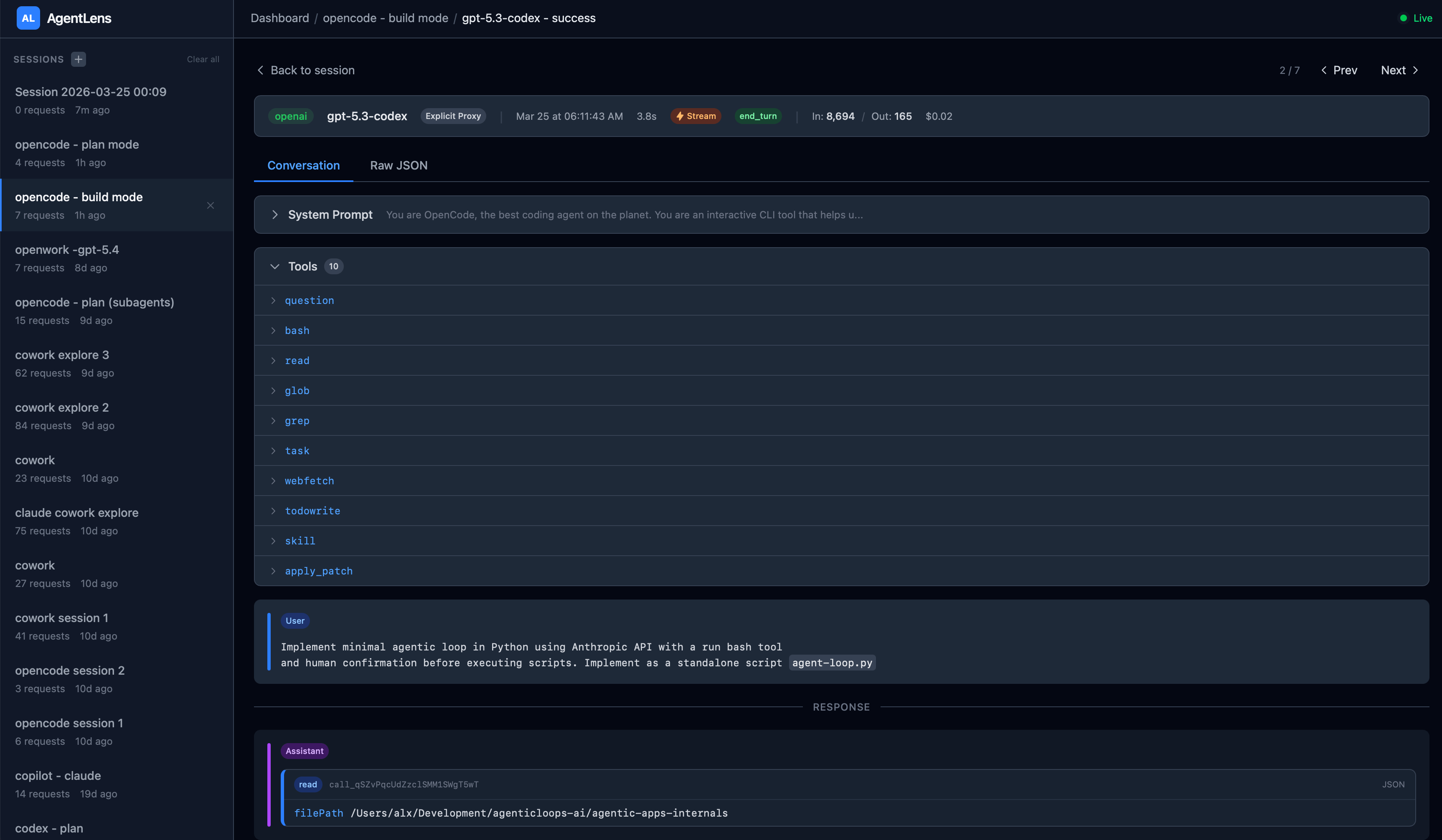
Build mode completed the task in 2 minutes 8 seconds across 7 requests.
Request #1 (2.7s) — Title generation: “Minimal Anthropic agent loop with bash confirm.” The title tax.
Request #2 (3.8s) —
readthe working directory.Request #3 (48.6s) — The main event:
apply_patchcreatesagent-loop.py(2,657 output tokens). LSP errors returned.Request #4 (9.2s) —
apply_patchagain: fixes the import viaimportlib, triggered by LSP feedback.Request #5 (2.3s) —
readthe updated file.Request #6 (6.2s) —
bashrunspython3 -m py_compilefor validation.Request #7 (8.6s) — Final summary (430 output tokens).
Total: 74,485 tokens (95% input, 5% output). No prompt caching. Copilot’s equivalent session was 123,783 tokens in 1m 29s. Claude Code was 74,317 tokens in 2m 04s. OpenCode lands at nearly the same token count as Claude Code, with comparable wall time.
Plan mode completed in 2 minutes 10 seconds across 4 requests. One title generation, two read-only tool passes (glob to scan the workspace, read to inspect files), then a comprehensive plan output. 43,425 total tokens. The plan covered scope, file structure, API integration, loop logic, approval UX, safety guardrails, and a testing checklist.
What Engineers Can Take Away
Prompt size varies wildly across agents. OpenCode uses 1,171 words. Claude Code uses ~2,350. Copilot uses ~3,900. All three completed the same task. What each team chooses to spend prompt tokens on tells you what they think matters.
Integrated tool feedback changes model behavior. OpenCode’s apply_patch returning LSP errors caused the model to change its implementation strategy mid-session. If your tools return only success/failure, the model can’t learn from the environment. Rich tool results (diagnostics, warnings, context) turn tool calls into feedback loops.
Provider agnosticism has a prompt cost. OpenCode’s shorter, more generic system prompt works across many models but can’t optimize for model-specific strengths. Claude Code’s <system-reminder> pattern exploits Claude’s instruction following. Copilot’s XML architecture matches OpenAI’s model behaviors. The flexibility trade-off is real: you gain model choice, you lose optimization depth.
Mode enforcement is a spectrum. Copilot removes tools. Claude Code and OpenCode both inject <system-reminder>blocks forbidding writes. All three produce working plans. The structural approach (Copilot) makes violations impossible. The trust-based approach (Claude Code, OpenCode) makes them a model judgment call.
Overhead reveals product priorities. Title generation, warmup pings, activity summaries — each adds latency and cost. Copilot invests 5 overhead requests in routing and summaries. Claude Code invests in health checks and path extraction. OpenCode invests in a conversation title. What you spend resources on before the first useful token tells you what the product team values.
The Architecture
Three Agents, Three Philosophies
Copilot
Provider: Any (OpenAI used)
Tools: 65 / 22
Overhead requests: 5 of 11
System prompt: ~3,900 words
Mode differentiation: Tool removal + prompt override
File editing: V4A patch format
Build session: 123,783 tokens in 1m 29s
Claude Code
Provider: Anthropic
Tools: 24 / 24
Overhead requests: 4 of 11
System prompt: ~2,350 words
Mode differentiation: System-reminder injection
File editing: Write/Edit tools
Build session: 74,317 tokens in 2m 04s
OpenCode
Provider: Any (OpenAI used)
Tools: 10 / 10
Overhead requests: 1 of 7
System prompt: ~1,600 tokens
Mode differentiation: System-reminder injection (via user message)
File editing: apply_patch (structured diff + LSP)
Build session: 74,485 tokens in 2m 08s
How We Captured This
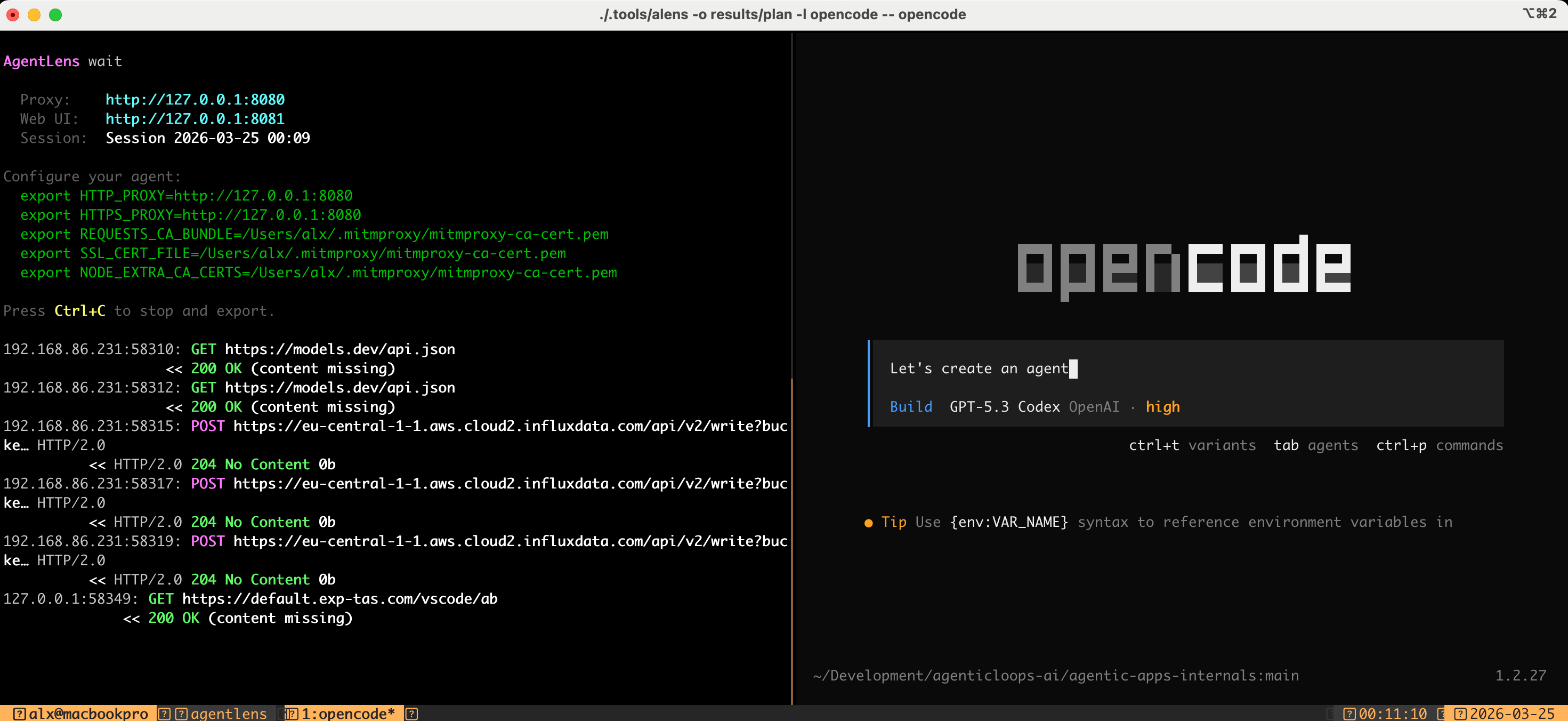
All data was captured using AgentLens, an open-source MITM proxy that intercepts LLM API traffic. It sits between the agent and the API, recording complete untruncated requests and responses - system prompts, tool schemas, model responses (including thinking blocks), token counts, and timing. Nothing is inferred; it’s the raw wire protocol.
Explore the Raw Data
Everything referenced in this post is available in agenticloops/agentic-apps-internals:
System prompts for both modes — build and plan
Complete tool catalog (10 tools) — schemas, descriptions, mode deltas
Prompt engineering analysis — stats and patterns across modes
Session traces — turn-by-turn data for each mode
Full transcripts — complete API payloads for independent analysis
From Reading to Building
We’re publishing agent engineering content every week. No hype. Just code and learned patterns.
Full code for these patterns is available at agenticloops-ai/ai-agents-engineering. Fork it, break it, build on it. The best way to understand how agents work is to build one yourself.
What’s Next
Next in the series: we’ll disassemble Codex CLI — OpenAI’s terminal-native coding agent — and see how the minimalist approach compares.
Which AI agent should we disassemble next? Drop it in the comments.